The best tools to manage emails with AI: Delos, Superhuman, Fyxer and ChatGPT


According to an Adobe study cited by Les Echos, managers spend on average several hours a day (up to 5 hours) to process their emails. This figure is down compared to previous years, but it remains the most time-consuming individual task in the office, far ahead of meetings or the search for information.
What has changed is availability tools capable of taking on some of this load. AI no longer only offers to sort more quickly or to remind overdue reminders. It can understand the intent of an email, write a response in your own style, summarize a thread of 40 messages in three lines, and anticipate follow-ups before you even think about it.
What AI is actually changing in email management
Email management is based on three types of tasks that focus the majority of the time lost: qualify incoming messages (urgency, importance, action required), write the answers (tone, structure, formulation), and ensure follow-up (reminders, archiving, prioritization).
AI intervenes differently depending on the tools at each of these stages. Some affect the interface and the processing speed. Others act on assisted writing. Still others allow email management to be integrated into a larger automated process.
How to effectively compare AI email management tools
The first criterion is integration into the existing environment. A tool that requires leaving Gmail or Outlook creates friction that limits adoption. The question is not only “does it work”, but “will my teams really use it”.
The second criterion is The quality of assisted writing. Generating smooth text is one thing. Generating a text that respects the tone of the company, adapts to the recipient and remains consistent from one user to another is another.
The third criterion is the ability to function within a larger workflow. An email is not an isolated object: it often triggers an action in a CRM, a reminder, a file update. A tool that does not fit into this flow is still a one-time tool.
Finally comes the question of data sovereignty. For a company that deals with confidential information or customer data, knowing where emails are processed is not a technical detail. It is a question of RGPD compliance.
Features designed for productivity in mailbox management as well (reminders, categorization, urgent emails, etc.)
Delos Mail
Delos is a AI office suite Who brings together Ten applications in a single interface. Its module dedicated to emails, Delos Mail, automatically sorts and prioritizes messages according to their importance, and writes draft responses by adapting the tone according to the interlocutor. Emails are automated, sorted and categorized. Drafts are ready to be sent.
What sets Delos apart from the other tools on this list is the integration into a complete work environment. Mail is not an isolated application: it coexists with Scribe (writing), Recap (meeting minutes), Explore (web search), Docs (documentary analysis) and Calendar (agenda). A user can go from reading an email to generating a report or a document without changing platforms.
The whole thing is hosted on sovereign servers (US, Europe or EMEA depending on your region), ensuring a full compliance with local laws.
Strengths
- Automatic sorting and prioritization of emails according to their importance, without manual action
- Drafts ready to be sent with Adapted tone to each interlocutor
- Native integration with other Delos applications: an email can directly trigger a report, a document or a search without changing the tool
- Sovereign local accommodation, GDPR compliance, no data transmitted to train external models
- Already used by TotalEnergies, Shiseido, Grant Thornton, the Ministry of the Armed Forces and more than 100,000 professionals
Limits and points of vigilance
- The value becomes fully measurable when the suite is used as a whole: Mail alone is effective, but the gain is much greater when Recap, Scribe and Calendar are activated in parallel
- Like all assisted writing tools, the generated drafts deserve to be proofread before sending on messages with a high relational impact.
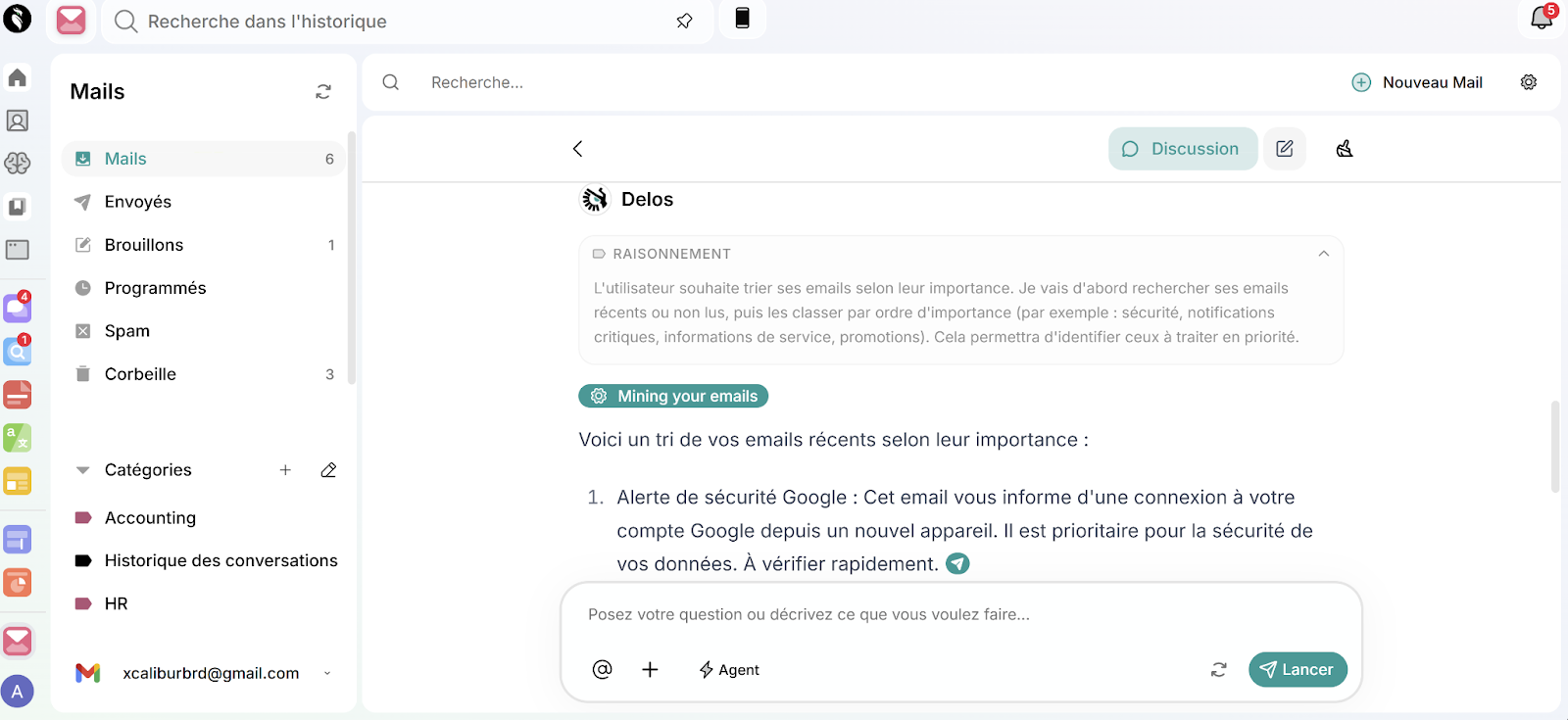
On the left, the interface displays categories created automatically by the tool (Accounting, HR, Conversation History) allowing you to find an email in a few seconds without manual sorting.
On the right, Delos analyzes incoming emails and ranks them in order of importance: here, a critical security alert is identified and reported as a priority, with an explanation of the context and the action to be taken. The whole thing works in the background, without user intervention.
Superhuman
Superhuman is a compatible email client Gmail and Outlook, designed around a single principle: to achieve the “Inbox Zero” as quickly as possible. Its interface is based on more than 100 keyboard shortcuts and an AI that gradually learns the user's writing style from the emails sent.
In October 2025, Superhuman launched its biggest AI update with three new features: Auto Drafts (follow-ups written automatically in your voice, available on the Business plan), Auto Labels (automatic classification of each incoming email: “response required”, “pending”, “meetings”, “cold pitch”) and Auto Archive (marketing emails and prospections archived without intervention).
According to data published by Superhuman, users process their emails Twice as fast and respond on average 12 hours ago, with a gain of 4 hours per week.
Strengths
- Documented time savings: 2x faster on the treatment of the inbox, 4 hours saved per week according to user data
- Auto Archive eliminates marketing emails and cold emails from the main view without any manual action
- AI that learns personal writing style: the drafts generated correspond to the user's tone
- Compatible Gmail and Outlook, with iOS and Android applications
Limits and points of vigilance
- Premium rate without a free version: Starter plan at $30/month, Business plan at $40/month. Advanced AI functions (Auto Drafts, Ask AI, Custom Labels) are reserved for the Business plan
- Hosting in the United States: the data is processed outside Europe, RGPD not guaranteed for emails containing sensitive information
Fyxer
Fyxer is an AI assistant that connects to your Gmail or Outlook account without replacing your email client. It automatically sorts incoming messages into actionable categories (“to reply”, “notification”, “FYI”, “marketing”), writes draft responses in your tone, takes notes during your meetings, and generates the corresponding follow-up emails. Learning writing style is unresponsive : no manual configuration is necessary, the template is adapted from your emails sent.
Fyxer offers a free trial of 7 days, then a Starter subscription to $30/month (or $22.50/month billed annually) and a Professional subscription to $50/month (or $37.50/month annual), which includes the management of multiple mailboxes, the HubSpot integration, and the ability to import documents to refine the model.
Strengths
- No interface changes: Fyxer overlaps with Gmail or Outlook, removing the adoption barrier
- Automatic meeting note-taking (Zoom, Google Meet, Teams) and generation of follow-up emails included in a single subscription
- RGPD compliance guaranteed
- Free trial of 7 days without commitment
Limits and points of vigilance
- Unequal reliability depending on the context: according to the Review published by tl; dv In January 2026, responses to complex or unusual emails may lack context and require complete rewriting.
- No “inbox zero” logic in the strict sense: processed emails remain visible in their category without disappearing from the main view, which can create confusion about what has been processed
- Not very suitable for a standardization at the team level : learning is individual, with no possibility of sharing templates or agents between collaborators
GPT chat
ChatGPT is not an email client. It is a editorial assistant that most users incorporate into their flow when describing the context of an email to get a written, reformulated, or summarized version. Its strength is not in the automation of volume, but in the quality of production on complex emails : delicate rejection messages, commercial proposals to be structured, responses to conflict situations.
Strengths
- High editorial quality on emails to strong relational challenge : reduces the time it takes to formulate difficult messages
- Summary of long discussion threads in a few seconds, useful to find the context before a meeting or a follow-up
- Total versatility: emails are only one use among others (analysis, summary, writing documents), which optimizes the return on the subscription
- Available immediately via browser, mobile application and API, without configuration
Limits and points of vigilance
- Usage session by session : without a persistent memory of the context between exchanges, each email requires the situation to be re-explained, which limits the gain in volume
- Requires manual action for each email (describe the context, copy and paste): not suitable for processing a high-volume inbox
- Accommodation in the United States: RGPD not guaranteed for sensitive information transmitted in prompts
- Does not solve sorting, classification, or automatic tracking problems
Conclusion
While these platforms all have advantages and disadvantages, the new challenge in the adoption of AI tools is also becoming the centralization of uses. In 2026, the market has no shortage of solutions: dozens of specialized platforms cover writing, research, sorting, meetings, and translation. The problem is no longer finding a powerful tool. It's not to end up with five separate subscriptions with five interfaces to form etc.
That is precisely what is changing the orchestration logic : access the most efficient models on the market (GPT, Claude, Claude, Gemini, Mistral...) according to the task, in a unique environment, without choosing once and for all between them. On email management as well as on other office uses, Delos automatically selects the most suitable model as we ask him.
For organizations that want to take advantage of the best AIs available without multiplying licenses or dispersing their data, it is a concrete answer to a problem that specialized tools, taken separately, do not solve.
To find out how Delos can transform your email management and save you several hours per week, click here: Discover Delos Mail
.jpeg)



Ready to start with Delos?
Start now with a 7-day free trial or ask for personalized support.