How to create your portfolio in 5 minutes


According to INSEE published in 2025, France counted 4.4 million self-employed workers in 2022, a figure that has been constantly increasing since the creation of the micro-entrepreneur status.
Having an online portfolio has therefore become a real work tool. For a freelancer or an independent consultant, this is often what makes the difference between a convinced customer and a missed opportunity. It cannot be improvised but it does not require advanced technical skills either.
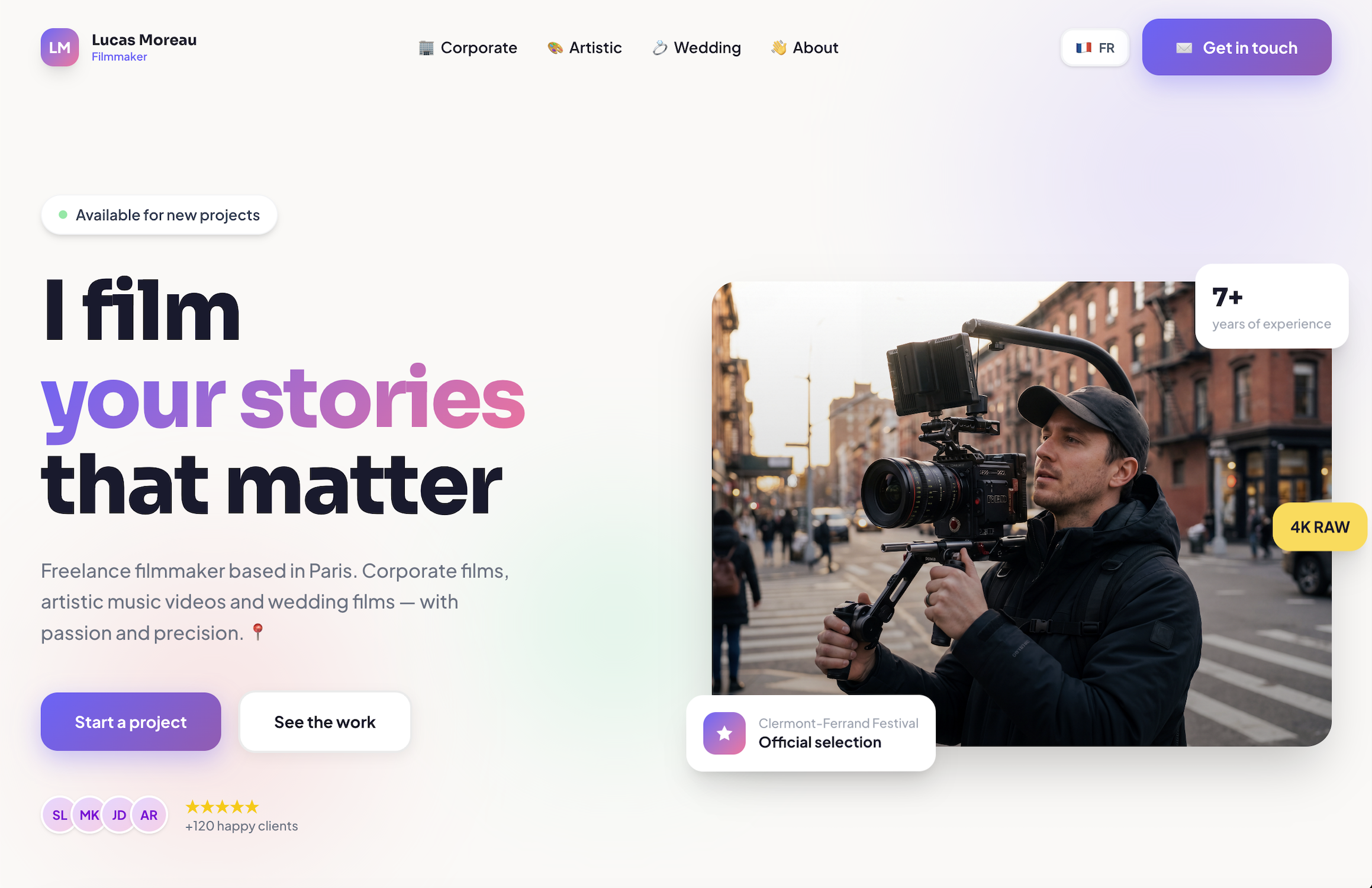
In this guide we will follow the creation of the portfolio of a fictional character: Lucas Moreau, a video artist who works on corporate, artistic and wedding video projects.
What is an online portfolio? Who is it for?
An online portfolio is a page Or a website Who presents your professional identity, your completions, and the scores obtained for your customers or employers. Where the resume lists what you did, the portfolio shows how you did it and what it actually produced.
It is aimed at all professionals whose work can be illustrated by measurable results:
- Freelancers : marketing, design, development, consulting, consulting, writing, translation, photography
- Independent consultants : in all sectors, from strategy to human resources
- Employees retraining or in active search : to distinguish yourself from classical profiles
- Students and young graduates: to compensate for the lack of formal experience with concrete projects
A portfolio most often contains: a short presentation (bio and professional title), 3 to 6 project case studies, customer testimonies if available, and a direct means of contact.
Prerequisites: What you need before you start
Before launching any tool, three fundamental elements are necessary:
- Your professional title: a clear and precise line (e.g.: “B2B digital strategy consultant, specialized in industrial SMEs”)
- 3 to 5 representative projects or missions: with context, actions taken, and a measurable result per project
- A basic visual element: recent professional photo, personal logo, or dominant brand color
These items take 15 to 20 minutes to put together. Everything else is automated or accelerated with the tools described below.
Step 1: Define your positioning with AI (tool: Claude or ChatGPT, free)
Before creating anything visually, one question arises: who is your portfolio for, and for what type of mission?
A portfolio intended for industrial SMEs is not built like a portfolio for tech startups.
On Claude.ai or ChatGPT (or other generative chatbot), enter the Prompt next:
“I am [your job], specialized in [your field], with [X years] of experience. Help me define my positioning in 3 lines, and write a catchy professional title of 12 words maximum.”
AI immediately produces several options. Choose the one that best fits your priority target. Rework it in two or three iterations. Adjust the vocabulary to match the vocabulary of your customers.
Lucas' example: Lucas enters his information into Claude. The AI offers him several formulations. He recalls: “A professional videographer, I design, produce and edit all your personal or professional projects by adapting to your needs.”
Estimated time: 20 minutes (initial thinking + iterations with the AI). Without AI: 2 to 3 hours.
Step 2: Gather and structure your achievements
It is the most time-consuming step. You have to find old projects in your archives, extract the relevant figures, and structure them in a usable format.
For each project, use this format in three blocks:
- Background: type of project, sector, company size, initial problem (1 sentence)
- Action: What you did concretely (2 to 3 points)
- Result: a number, a time frame, a savings, or a measurable growth (required)
Numerical results help to give visibility to your customers.
Example from Lucas: Lucas retrieves his 10 previous projects for each of the categories. For each one, he enters his raw notes into the AI and asks for a reformulation according to the context/action/result format.
Estimated time: 1h30 to 2h depending on the organization of your archives and notes.
Step 3: Create your visuals with Canva (free)
A portfolio without visuals loses credibility, especially in sectors where communication is valued. Canva offers dozens of portfolio templates in its free version, with no graphic skills required.
Go to canva.com, search for “professional portfolio,” and select a simple template. Replace sample text and images with your own content. The free plan fully covers the needs of a professional portfolio:
- LinkedIn profile and web portfolio header banner
- Presentation thumbnails per project (square or 16:9 format)
- PDF export of the complete portfolio, ideal for sending by email
- Cover page for commercial proposals
Example from Lucas: Thomas wants a dynamic, stylized portfolio with a strong visual style that highlights his profile and his achievements.
Estimated time: 45 minutes to 1 hour for 5 project visuals and a banner.
Step 4: Writing case studies with AI
Why is this step different from step 2: in step 2, you collected raw data (figures, dates, mission notes). This data is not yet portfolio text. A case study is a short, written description (60 to 100 words) that presents a project in a compelling way for a client who reads in 20 seconds. Without this step, your portfolio looks like a data table rather than a professional showcase.
For each project, enter ChatGPT or Claude:
“Here is the raw data of my mission: [context, actions, results]. Write an 80-word case study in a professional and direct tone, with the numerical results highlighted at the beginning of the description.”
AI produces structured text. Correct 2 to 3 sentences per project to reintegrate specific details that the AI does not know, including sector names or market contexts.
Example from Lucas: Lucas writes his 5 projects in 35 minutes. Each text is coherent, professional, and focused on the result. It now has 5 text blocks ready to be integrated into its publishing platform.
Estimated time: 30 to 45 minutes for 5 case studies or complete achievements.
Step 5: Choose and configure your publishing platform (free options)
Three free platforms based on your profile and work habits.
Notion + notion.site, for versatile and analytical profiles:
- Create a structured Notion page with bio, projects, and contact
- Publish it in one click via notion.site
- Result: a clean and professional URL, without a line of code
Carrd.co, for creative profiles (design, communication, marketing):
- Elegant one-page site, optimized for mobile by default
- Free plan: up to 3 sites with carrd.co domain included
- Online in less than 15 minutes with the available templates
Read.CV, for tech, product and design profiles:
- Sleek interface, designed for professional portfolios
- Direct integration with LinkedIn and GitHub
- 100% free, no ads, no project limits
All three of these options work. They each require manual configuration, repeated formatting with each update, and constant back and forth with the writing and visual creation tools used in the previous steps.
Estimated time: 1 hour to 1.5 hours depending on the platform chosen and the care taken in the organization.
Step 6: Broadcast and activate portfolio visibility
Publishing is not enough. The portfolio needs to be found. The following dissemination actions are to be carried out within 24 hours after being put online.
- LinkedIn: add the URL in the “Info” section and in your banner. Post an announcement post that the AI writes in 30 seconds.
- Email signature: add “Portfolio: [link]” to all of your professional signatures
- CV: replace “references available on request” with the direct link to your portfolio
- Freelance platforms: Malt, Comet, Upwork, Crème de la Crème: integrate the URL into your profile and presentation
Estimated time: 30-45 minutes for the full initial broadcast.
Step 7: Maintain and update your portfolio regularly
This is the step that the majority of professionals overlook. A portfolio that is not updated gradually loses credibility. Potential customers notice that the last mission was two years ago.
Best practices to adopt from the start:
- Add each new mission within 2 weeks of completion, while numbers are still available
- Update the bio and the title every 6 months to reflect the evolution of your positioning
- Verify that all links are working every quarter
- Archive projects older than 3 years to keep a page readable and relevant
Lucas' example: Lucas schedules a 30-minute monthly session in his agenda. Each month, he reopens his platform, finds his mission notes, relaunches ChatGPT to reformulate, re-exports his visuals from Canva, and copies everything back. Four different tools, thirty minutes of repeated friction.
Estimated time: 30 to 45 minutes per month, with back and forth between 4 different tools.
What this process really reveals
Here is the objective assessment of the tools and time used by Thomas to create his portfolio from scratch:
Step
Tool (s) used
Estimated time
- Positioning: ChatGPT/Claude (free) - 20 min
- Achievements: Personal archives + AI - 1h30 to 2h
- Visuals: Canva (free) - 45 min to 1 hour
- Case studies: ChatGPT/Claude (free) - 30 to 45 min
- Publication: Notion/Card/Read.CV (free) - 1h to 1h30
- Broadcast: LinkedIn, email, freelance platforms - 30 to 45 min
- Update (monthly): 4 different tools - 30 to 45 min/month
So you have to count about 6 to 7 hours spread over several days, with going back and forth between four different tools that do not communicate with each other.
This is the real cost of the free: each tool covers part of the need, but none covers all of it. And this fragmentation is repeated with each monthly update.
Centralize the entire process with Delos
Delos is an AI office suite that combines these uses in a single interface. It's not an AI model: it's a platform of 10 integrated applications, designed for professionals who want to work effectively without multiplying tools and subscriptions.
In concrete terms, here is how Delos replaces the four tools used by Lucas:
Delos Chat intelligently orchestrate the best models on the market (GPT-5, GPT-4.1, GPT-4.1, Claude 3.7 Sonnet, Mistral Large, LLama 3) according to the nature of the task. A single interface for writing the bio, the case studies, and the LinkedIn post. With the integrated individual memory, Lucas' information on his missions and his positioning is kept from one session to the next: he does not have to re-enter everything each time he uses it.
Delos Docs is the real acceleration over the longest stage. By directly loading his old mission reports, presentations and reports, Lucas interviews Delos to extract the key results: “What are the summaries of my last 5 achievements?” What took him 1.5 hours of manual digging through his archives became a conversation lasting a few minutes. In addition, if some items are lost in these emails, Delos Mail makes it possible to find them in a few clicks.
Delos Vibe allows you to generate the portfolio directly with a prompt. Lucas describes what he wants, the application produces a page with project galleries, about sections, and contact options, without writing a line of code.
And every month, the nature of the update changes: all mission data is centralized in Delos. Lucas no longer has to open four tools and copy and paste between them. His information is already there, he is adding his new notes and his portfolio is up to date.
Data side: Delos is hosted on Scaleway servers in Paris, with Encryption in transit and at rest. No data is used to train AI models. An important point for a consultant working on confidential missions.
Delos is a paid solution, starting from €25 per month. This amount corresponds to less than one hour of work compared to 6 to 7 hours lost managing four free tools.
Here is the portfolio created for Lucas in a few minutes with Delos Vibe: https://portfolio-videaste.dls.so/
Conclusion
Creating a professional portfolio takes time. With free tools and a structured method, it's entirely doable. But this approach has a real cost: fragmentation between tools, friction with each update, and hours spent copying and pasting between interfaces that don't communicate.
In 2026, the question is no longer whether you need a portfolio. It's knowing how much time you're ready to spend on it each month.
Delos centralizes AI writing, the extraction of information from your documents and the creation of the portfolio. It can also centralize your searches in your documents and much more. All your data is hosted in France, with a guarantee of data sovereignty.
Discover Delos and start centralizing your work: www.delos.so/en
.jpeg)



Ready to start with Delos?
Start now with a 7-day free trial or ask for personalized support.